Visit Japan Web: QR Code Guide
When visiting a foreign country, going through customs and immigration can be nerve wracking. However, Japan has a seamless way of making it as painless as possible. It is called Visit Japan Web (VJW). This article will help answer questions on how to use this service, and how it can be useful.
What is Customs and Immigration
But first, what are customs and immigrations. When traveling internationally, all travelers must have their documents and belongings checked by the government to verify and check what is coming into the country. It can be a super simple procedure, but it is connotative with being a long and arduous process. That is why Visit Japan Web exists.
- Immigrations: Checks people, verifying visas and passports for entry
- Customs: checks items, goods and cash.
What is Visit Japan Web (VJW)
Visit Japan Web (JJW ) is a free website service offered by the Digital Agency of Japan. Allows travelers to preregister for customs and immigrations. It allows seamless entry by showing a QR code to speed up entry into Japan. Its goal was to streamline the airport procedures so that travelers would not be bottlenecked at customs and immigration.
Is VJW optional?
Short answer, yes. Major international airports of Japan, (Haneda and Narita) still have paper forms you can fill out. On some flights, the flight attendants will give out the forms to complete in the plane.
Who can use VJW?
Anyone traveling or coming back to Japan can use VJW.
| Traveler Type | Can they use VJW? | Comments |
| Foreign tourists (short-term visitors) | ✅ Yes | Ideal for smooth immigration and customs processing. |
| Business travelers | ✅ Yes | Same process as tourists; enter trip details in advance. |
| Foreign residents returning to Japan | ✅ Yes | Can register entry information and skip paper forms. |
| Japanese citizens returning from abroad | ❌ Not needed | They use a separate, simpler immigration line and do not need VJW. |
| Transit passengers entering Japan (leaving secure zone) | ✅ Yes | Required if you must pass through immigration before connecting. |
| Transit passengers staying airside (not entering Japan) | ❌ No | You do not pass through immigration or customs. |
| Families with children | ✅ Yes | Parents can add minors under one account. |
| Large tour groups | ✅ Yes | Travelers must register individually, but agents can assist. |
| Travelers without smartphones | ⚠️ Limited | VJW can be done on a computer and printed, or paper forms can be used instead. |
| Seniors or non-tech users | ✅ Yes | Recommended with assistance; screen-print QR codes for convenience. |
How does VJW work?
A simple overview is below. A step by step guide is given later in the article.
- Create/login into an account: Register to the app by giving your email.
- Input personal details: DOB, passport credentials, how many in your party (up to 10 members in a party.), etc
- Input flight details: Register flight number, and arrival date.
- Input details for the custom and immigration form: Complete all questions to receive the unique QR code.
- Wait for confirmation: Check back periodically to see if your application has been approved.
- Access QR: Hit the display QR code button. (Screen shot the QR code for easy access.)
Paper forms?
Paper forms are available near the customs and immigration counters. Easily found and in multiple languages. The most common in the Japan airports are Japanese and English.
Flight attendants will also distribute them on the flight about 30 mins before landing.
Common problems
| Problem | Why It Happens | How to Fix It |
| QR code not loading | Slow internet, browser issues, or server congestion | Refresh the page, switch to a different browser, or use airport Wi-Fi. Screenshot your QR code before traveling. |
| Cannot log in | Incorrect password or using a different email than registered | Reset your password, confirm your login email, or try accessing from another device. |
| Approval not received in time | Missing information or high traffic on the system | Double-check all required fields. Submit forms at least a week before travel. |
| Passport scan fails | Camera blur or reflective lighting | Move to better lighting and clean your camera lens. Enter details manually if scanning continues to fail. |
| Information entered incorrectly | Typing errors in passport details, names, or flight info | Edit your submission and resubmit. If at the airport, you can be processed manually. |
| Unable to update flight details | Flight changes after submission | Delete the old trip and re-enter updated flight information. |
| System not working on phone | Browser compatibility issues | Use Chrome or Safari, or complete the process on a computer and print the QR codes. |
| Cannot access phone offline | No roaming or Wi-Fi after landing | Screenshot or print your QR codes before your flight so you can show them without the internet. |
| Family members not added correctly | Travelers forget to register minors under one account | Add family members under “Add Traveler” and ensure each person has their own QR code. |
| Customs or immigration form shows errors | Missing required fields | Review your answers, ensure all mandatory sections are filled, then save again. |
Flight delayed, rescheduled, or canceled.
Having a flight that has problems can be the most stressful experience. However, VJW still makes it easier.
- If your flight is delayed but still has the same flight number. Then you do not have to update VJW.
- If your flight is rescheduled, then there is no update needed.
- If your flight is canceled, then it gets a little complicated, but is still simple. Just update the flight number, and the app will redisplay the QR code.
Also, there is still the paper form if the app is unoperative.
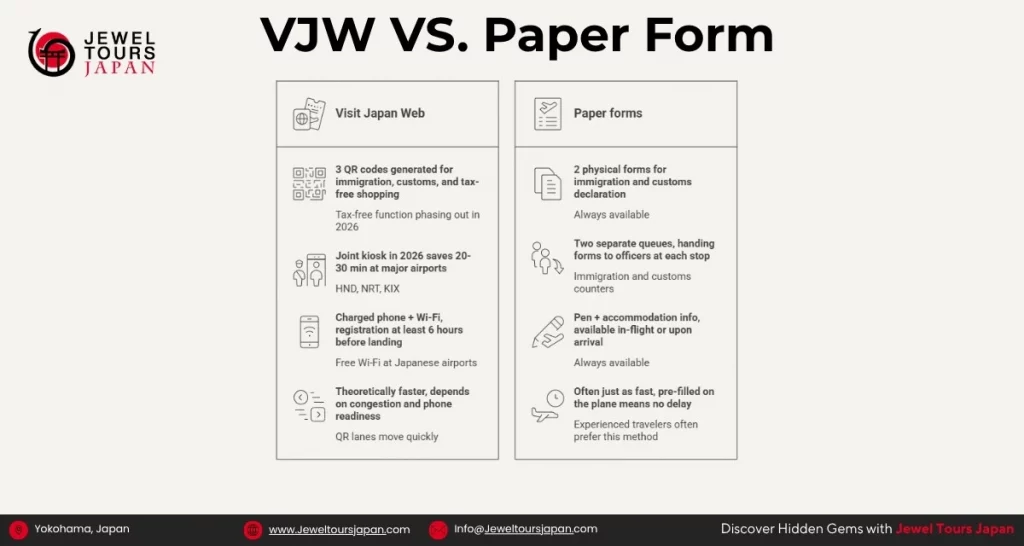
VJW vs Paper forms
With the choice of paper and online customs and immigration forms, it can be tricky to figure out which one is best. The infographic helps outline some of the some things to take into consideration.
What can you declare in a VJW?
Knowing what to declare on your VJW can be difficult. The table below shows the essentials of what to declare. Plus, in the app, it will walk you through the different sections and categories of what to declare.
| Category | Examples of What Must Be Declared | Notes / Restrictions |
| Medications | Prescription drugs, controlled substances, large quantities of over-the-counter medicine | Some medications may require a Yakkan Shōmei (import certificate). Always check Japan’s medication rules. |
| Cash / Monetary Instruments | Cash totaling over 1,000,000 yen, traveler’s checks, promissory notes | Must declare when entering or leaving Japan. No limit on bringing money, but declaration is mandatory. |
| Food Products | Meat, sausages, jerky, ham, dairy, eggs, fresh produce, seeds | Many animal-based foods are prohibited. Declare all food to avoid penalties. |
| Animal Products | Pet food, rawhide treats, feathers, animal-based souvenirs | Strict import rules. Most raw or unprocessed items are not allowed. |
| Plant Products | Fresh fruit, vegetables, bulbs, seeds, plants | Many plants require a phytosanitary certificate. Declare all to avoid confiscation. |
| Alcohol | More than 3 bottles (760 ml each) | Japan allows a limited duty-free alcohol amount. Declare if exceeding the limit. |
| Tobacco | More than 200 cigarettes, 50 cigars, or 250g of tobacco | Limits vary for adults vs. minors. Exceeding amounts must be declared. |
| Gifts / Merchandise | Items over 200,000 yen in value | High-value goods must be declared for tax purposes. |
| Firearms / Weapons | Guns, parts, ammunition, knives, pepper spray | Generally prohibited; must be declared immediately. |
| Pets or Animal Transport | Dogs, cats, birds, live animals | Requires advance quarantine procedures; must be declared. |
| Commercial Goods | Products intended for sale or business use | Requires proper documentation and declaration. |
Step by Step Guide
Now you have the app or are in the login page. What do you do now?
- Before using
- Set language: choose your desired language setting.
- Check FAQ inquires: after changing to your desired language, you can click on the Question mark icon, and look at the common FAQ for VJW.
- Offline Usage: on the same screen as the login screen, you can click on the Use the Visit Japan Website Offline. It will redirect you to the offline manual.
- Create account/Login
- Create a new account by accepting the terms of use. Then using your desired email address and creating a password. Finish by authenticating that I am a human.
- Login: Input your email and password.
- Registration planned entry/return
- On the home screen, click on register new planned entry/return. You can register up to 100 plans.
- It will ask you to copy your passport and visa (Optional) details into the plan.
- Input your flight information.
- Input your accommodation address. The hotel’s address is acceptable.
- Tell them who you are traveling with. If you have children, it is a great way to smoothly get through customs and immigration.
- Then confirm the details. The plan is finished.
- Quarantine (health check)
- Click on the quarantine (confirmation of health check) button.
- It will prompt you with questions asking about your health.
- Immigration clearance and customs declaration
- After doing the health check. It will now prompt you to do the immigration clearance and customs declaration.
- First you will register your basic information.
- Then information about the flight and trip.
- Then it will prompt you with questions for customs and immigration.
- Input the family members coming with you.
- Confirm all details.
- Show at customs and immigration.
- When is it yout turn, tell the officers that you have a VJW QR code.
- They will have you scan the QR code.
When you land in Japan for the first time it can be confusing on what to do. Please feel free to check out our other articles:
- Japan Travel Internet: eSIM vs SIM Card vs Pocket WiFi
- Tax-Free Shopping in Japan 2026: What’s Changing?
- Everything You Need to Know About Luggage Forwarding in Japan (Takkyubin)
To help you have an even smoother transition into Japan.
All in All
Using Visit Japan Web can make traveling to Japan a much less stressful environment. Having the ability to declare everything in the comfort of your home and at your own pace will make sure that all the information is correlated input. Rather than in a bus airport when all you want to do is go to the hotel and rest.
For more information about Visit Japan Web you can look at their website. And if you have any questions about the VJW service, want to talk to someone rather than look at a website, or any questions or concerns about Japan feel free to contact us at JewelTours Japan.
Advice
- Better to register the plan in advance for the trip.
- Always screenshot the QR codes.
- When in doubt about entering information, do it manually. That helps to prevent errors, and the prompts in the app will carefully guide you on what to enter.